 Antbuild
Antbuild
Antbuild
From an enquiry landing in your inbox to a customer getting an ETA on WhatsApp — here is the freight forwarding workflow LogisticsGen automates, and the operational problems it removes.
Logistics operators face daily friction that slows down shipments and eats into profit margins.
Teams spend significant time re-entering the same shipment data into multiple spreadsheets, emails, and documents.
Booking, customer, vendor, waybill, and billing data exist across separate isolated tools.
Operations teams spend hours repeatedly contacting carriers and vendors for rate sheets and container status.
Management lacks real-time visibility into active shipments, delayed containers, and pending payments.
Handling Airway Bills (AWB), Bills of Lading (BOL), and customs clearance papers manually leads to costly errors.
Endless email chains and messaging apps create operational bottlenecks and delayed customer updates.
Less manual data entry. Enquiry parsing, vendor price ranking, and document OCR — each with an operator review step.
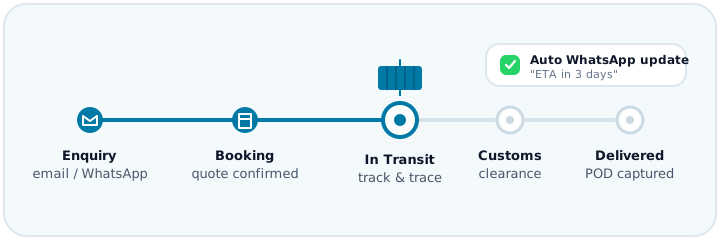
AI extracts origin, destination, weight, and volume from customer emails and messages and drafts a structured booking in LogisticsGen for an operator to confirm.
Carrier rate sheets and vendor quotes are normalised and ranked by cost and transit time, so the best option is surfaced rather than searched for by hand.
AI document readers scan Bills of Lading (BOL), Airway Bills (AWB), and Invoices—automatically populating database fields into LogisticsGen with high accuracy and a review step before commit.
LogisticsGen watches container track & trace feeds, flags likely delays, and sends templated WhatsApp status updates to customers — replacing manual status calls and emails.
Book a walkthrough with our engineering team, or explore the live product.
Book a Demo Visit logisticsgen.com